Bulk scheduling
A week of posts, scheduled in one sitting
Turn up to 20 photos or videos into scheduled posts in one go.
Included with every account. Writing the whole batch's captions with AI is part of the optional AI Studio add-on.
Built for the afternoon you batch content
- Media first
- Accounts once, overrides anywhere
- Captions for the whole batch
- Fits the tightest limit
- Automatic dates
- Approvals respected
01 · Upload
Start with the media, not a spreadsheet
- Images and videos, up to 20 per batch
- Pick from the media library or upload new files
- Counts toward your storage like any upload
They're back. Oat, sage and clay, the three colours you kept asking for, restocked in every size this morning.
#linenbedding #slowliving #bedroomdecor
Our three best-selling colours sold out in 11 days. Here's what we changed in production so it doesn't happen again.
#smallbusiness #supplychain
oat, sage and clay are back in stock. that's the post.
02 · Captions
Twenty captions, written in one pass
- One click for the whole batch (AI Studio add-on)
- Fitted to each post's tightest character limit
- Edit any caption before scheduling
03 · Dates
Dates and times that space themselves out
- Posts per day and hours between posts
- Any timezone, daylight saving handled
- Override any single post's date, and pick approvers once
Bulk schedule in 3 steps
Upload the media
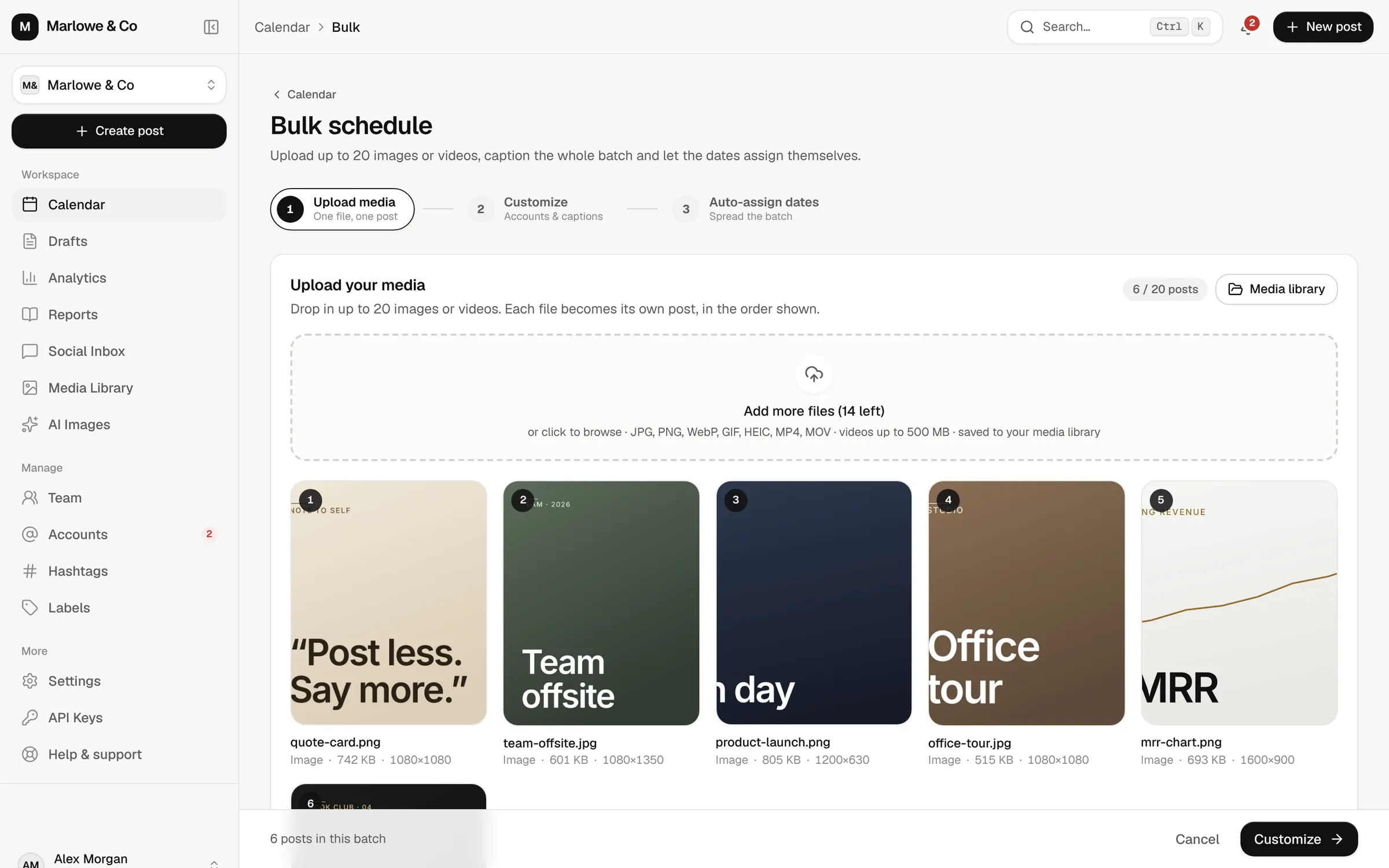
Drag in up to 20 images or videos, or pick them from the media library. Each file becomes a post.
Customise the batch
Choose accounts for every post at once, then adjust any single post. Write captions, or generate them all in one pass.
Let the dates fill in
Pick a start time, how many posts a day and the gap between them. Check the preview and schedule.
Platform support
Works across all 10 platforms
- X
- TikTok
- YouTube
- Threads
- Bluesky
- Google Business
Bulk Scheduling: common questions
How many posts can I schedule at once?
Do I need a CSV file?
Is AI captioning included?
Can different posts go to different accounts?
What happens to posts that need approval?
Bulk Scheduling in depth
What Bulk Scheduling does
Drop in up to 20 images or videos. Each one becomes a post: pick the accounts once, write or generate every caption, and let HeyOrbit spread the dates for you.
- Media first: Start from the photos and videos you already have. Up to 20 files per batch, each one a post.
- Accounts once, overrides anywhere: Select accounts for the whole batch, then change them on any single post.
- Captions for the whole batch: With the AI Studio add-on, AI writes every caption in one pass. Everything stays editable.
- Fits the tightest limit: Each caption is checked against the strictest platform in that post, with a live character counter.
- Automatic dates: Start date, posts per day and hours between posts. HeyOrbit works out every slot.
- Approvals respected: If a post needs sign-off, it goes through the same approval flow as anything written in the composer.
Upload: how it works
Most batching sessions begin with a folder of photos from a shoot. Drop them in, or pick them from the media library, and each file appears as a post card with its thumbnail, type and size.
Captions: how it works
With the optional AI Studio add-on, the AI assistant writes a caption for every post in the batch at once, each sized for the strictest platform it's going to. Prefer to write them yourself? Every caption field is right there with a live counter.
Dates: how it works
Tell HeyOrbit when to start, how many posts a day and how many hours apart. It assigns every slot in the workspace timezone (or any timezone you choose), shows you the last post's date, and warns you if a day would spill past midnight.
Why batching content saves your week
Writing and scheduling one post at a time means switching context all day: find the photo, write the caption, choose the accounts, pick a time, repeat. Batching turns that into one focused session, which is how most social teams already like to work.
Bulk scheduling in HeyOrbit is built around that session. You start from the shoot or the design export, and leave with a week or two of posts on the calendar.
Media first, because that's where posts start
Older bulk tools ask for a CSV with dates, captions and links to media hosted somewhere else. That's fine for a developer and painful for everyone else.
Here the files come first. Each upload becomes a post you can see, caption and date on one screen, without preparing anything in a spreadsheet beforehand.
Spacing posts sensibly
Posting ten things in an hour helps nobody. Automatic dates spread the batch across days at a pace you choose, in the timezone your audience lives in.
Everything lands on the content calendar, where you can still drag individual posts around afterwards.
Works hand in hand with
All featuresBatch the month, then get on with it.
Upload a shoot, caption it and schedule it in one sitting. Start free, no card needed.
Prefer to talk first? Book a call with our team
- Unlimited team members
- 10 platforms
- Start free, pay per account
