Team collaboration
Your whole team on board, with no seat fees
Unlimited teammates, five roles and discussions on every post.
Unlimited team members and reviewers, multi-step approvals and audit history, all included with every account.
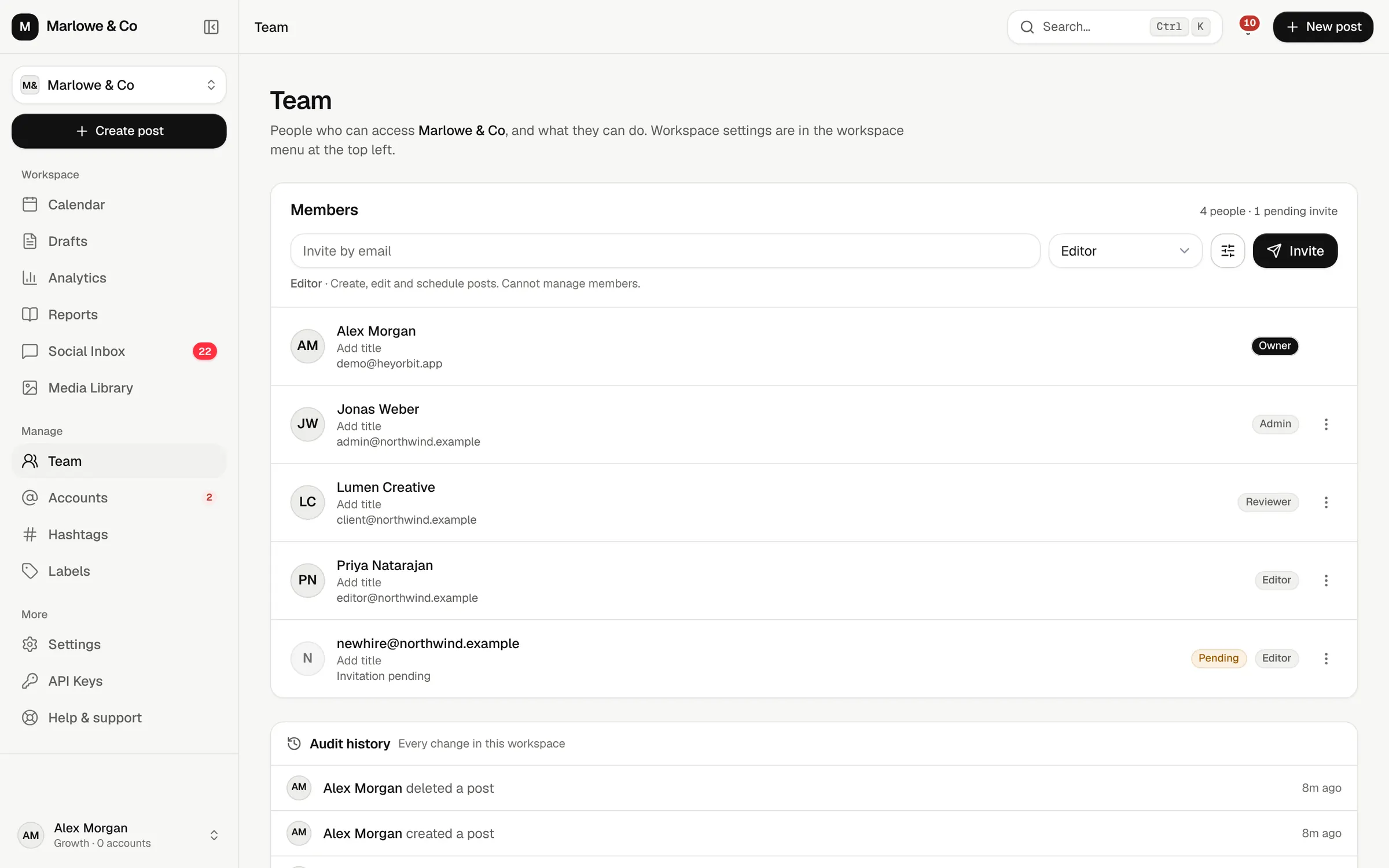
Collaboration without the chaos
- Unlimited team members
- Five roles
- Post discussions
- @mentions
- Notifications
- Audit history
01 · Roles
Everyone gets exactly the access they need
- Owner, Admin, Editor, Reviewer, Viewer
- Invite by email, change roles any time
- Unlimited members, never charged
New in: the Linen Series. Six colours, one promise: it gets softer every wash.
Approvers · all must approve
- Priya NatarajanManager Approved
- Daniel OkaforLegal Waiting
Discussion
Priya Natarajan 10:12
Swap the second image for the lifestyle shot? The flat lay reads a bit cold.
Sam Whitfield 10:40
Done — replaced with the kitchen shot and tightened the caption.
Priya Natarajan 10:52
Perfect. Approved from my side.
02 · Discussions
Feedback that stays with the post
- Threaded replies
- @mentions with notifications
- Also on the approval screen
- Priya Natarajan approved “Linen Series restock” 2 min ago
- Kofi Mensah mentioned you on “Spring launch”: can we swap the cover shot? 18 min ago
- Ines Moreau assigned you a comment from @lena.builds 1h ago
- “Spring launch” is waiting for your approval Yesterday
03 · Audit history
A clear record of who did what
- Every important action, timestamped
- Useful for handovers and compliance checks
- Included with every account
Bring the team in 3 steps
Invite people
Enter an email and pick a role. They get an invitation and land in the right workspace.
Work on posts together
Draft, comment, @mention and request approval, all on the post itself.
Keep a record
Notifications keep people in the loop; audit history shows who did what.
Platform support
Works across all 10 platforms
- X
- TikTok
- YouTube
- Threads
- Bluesky
- Google Business
Team Collaboration: common questions
Is there a limit on team members?
What can each role do?
Can managers or clients log in just to approve?
Is there an activity log?
How do notifications work?
Team Collaboration in depth
What Team Collaboration does
Invite as many people as you need, at no cost. Five roles keep everyone in their lane, and every post has its own discussion with @mentions, so feedback never gets lost in chat.
- Unlimited team members: Editors, designers, managers and reviewers never add to the bill.
- Five roles: Owner, Admin, Editor, Reviewer and Viewer, each with sensible permissions.
- Post discussions: Threaded comments on every post, with edit and delete for your own.
- @mentions: Mention a teammate and they're notified in the app and by email.
- Notifications: Approval requests, decisions, mentions and assignments, delivered where people look.
- Audit history: Who created, edited, approved and published what, with timestamps.
Roles: how it works
Owners handle billing, admins manage accounts and people, editors create and schedule, reviewers (a manager, legal, a client) comment and approve, viewers look without touching. Nobody needs a shared password.
Discussions: how it works
Every post has a discussion thread. @mention a teammate to pull them in, reply in a thread, and keep the conversation next to the caption and media it's about.
Audit history: how it works
Audit history shows who created, edited, approved and published posts, who joined the workspace and which accounts were connected, each with a timestamp.
Why per-seat pricing hurts social teams
Social media is a team sport: someone writes, someone designs, someone approves, and a manager or client wants a look. Per-seat pricing turns every one of those people into a budget question, so teams end up sharing logins.
Unlimited team members means you invite whoever should be involved, each with their own login and role, without a seat fee.
Roles that match how teams really work
Not everyone should be able to publish, and not everyone needs to. Five roles cover the realities of agencies and in-house teams, from the owner who pays to the stakeholder who only wants to look.
Clear roles also make approvals meaningful: you know who can sign off and who can't.
Conversations where the work is
Feedback in chat apps disappears. Feedback on the post stays with the caption and media it's about, and anyone opening the post later can see why it changed.
Mentions bring the right person in without forwarding screenshots.
Works hand in hand with
All featuresEveryone in, nobody's seat counted.
Invite your whole team and work on posts together. Start free, pay per account.
Prefer to talk first? Book a call with our team
- Unlimited team members
- 10 platforms
- Start free, pay per account