Social inbox
Every comment, DM and review, in one calm inbox
Comments, DMs and reviews from ten platforms in one inbox.
Included with every account. AI reply drafts in your brand voice are part of the optional AI Studio add-on.
Everything your team needs to answer faster
- Comments and messages
- Sentiment and spam tags
- Assign to a teammate
- Custom labels
- Saved replies
- DM auto-replies
01 · One list
Everything people say to your brand, in one place
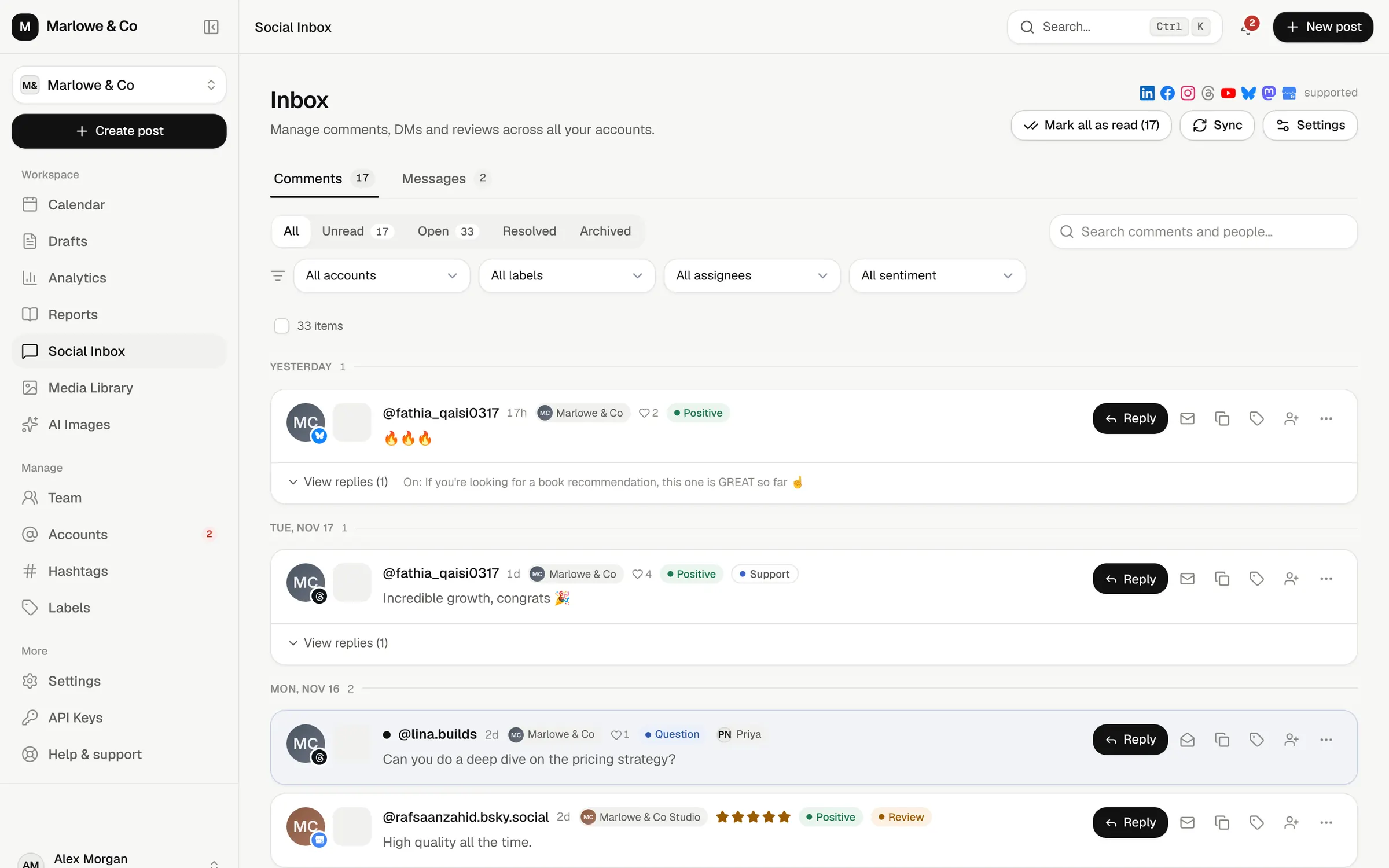
- Author, account and post for every comment
- Unread, open and assigned filters
- Mark all as read when you've caught up
- Priya Natarajan approved “Linen Series restock” 2 min ago
- Kofi Mensah mentioned you on “Spring launch”: can we swap the cover shot? 18 min ago
- Ines Moreau assigned you a comment from @lena.builds 1h ago
- “Spring launch” is waiting for your approval Yesterday
02 · Teamwork
Hand it to the person who should answer
- Auto-assign to one person or round robin
- "Assigned to me" filter
- Inbox alerts by email and in the app, batched so nobody is pinged per comment
- Ava ChenIs the oat colour back in…
- Ben OrtizThanks, got it!
- Harriet S.Can I change my order to…
- Jules P.Sent the photos over
Hi! Is the oat colour back in stock for the queen size?
It is — restocked this morning. Want me to send a link?
Yes please!
03 · Messages
Direct messages with a proper conversation view
- Conversation view for DMs
- Keyword auto-replies and an away message (Instagram and Facebook)
- Instagram and Facebook replies up to 7 days later
Inbox zero in 3 steps
Connect your accounts
Comments, messages and reviews start flowing in for every platform that allows it.
Sort it out
Filter by unread, account, label, sentiment or assignee, and hand conversations to the right person.
Reply and move on
Answer inline, use a saved reply, and mark it done. The reply posts on the platform itself.
Platform support
Works across all 10 platforms
Comments: Instagram, Facebook, TikTok, LinkedIn company pages, YouTube, Threads, Bluesky and Mastodon, plus replies on X. Messages: Instagram, Facebook, TikTok, Bluesky and X. Reviews: Google Business and Facebook. TikTok comments and messages come through TikTok's business connection. X replies and messages come in once the X inbox is enabled in Zernio, the service HeyOrbit connects X through, and are checked every 30 minutes. Pinterest comments and LinkedIn personal profiles aren't synced into the inbox.
- TikTok
- X
- Google Business
- YouTube
- Threads
- Bluesky
- Mastodon
Social Inbox: common questions
Which platforms does the inbox support?
Can I answer an Instagram or Facebook message after 24 hours?
Can I like comments from the inbox?
Do my replies post on the platform?
How is sentiment decided?
Can I hide or delete comments?
Is the inbox included?
Social Inbox in depth
What Social Inbox does
Reply to comments from Instagram, Facebook, TikTok, LinkedIn company pages, YouTube, Threads, Bluesky and Mastodon, replies on X, direct messages from Instagram, Facebook, TikTok, Bluesky and X, and Google and Facebook reviews, without opening ten apps. Labels, assignees and sentiment keep the team on top of it.
- Comments and messages: Comments and DMs in separate tabs, each with unread counts.
- Sentiment and spam tags: Every new item is tagged positive, neutral or negative, with questions and spam flagged.
- Assign to a teammate: Give a conversation to the right person; they're notified straight away.
- Custom labels: Coloured labels for leads, support, press or anything your team tracks.
- Saved replies: Answers you give every week, ready to insert and tweak.
- DM auto-replies: Keyword replies and an away message for Instagram and Facebook messages.
One list: how it works
Each item shows who wrote it, which account and post it's on, when, and how it reads. Open it to see the thread, reply, or jump to the original on the platform.
Teamwork: how it works
Assign a comment or conversation to a teammate and they're notified in the app and by email. Auto-assign can share new conversations around the team, so nothing waits for someone to notice it.
Messages: how it works
Messages from Instagram, Facebook, TikTok, Bluesky and X appear as conversations. Set keyword auto-replies for the Instagram and Facebook questions you get every day, and an away message for outside business hours. Meta lets a business answer within 24 hours of a person's last message; after that, a reply you type goes out as a human-agent reply, which Meta allows for up to 7 days.
Why a unified social inbox matters
Comments are where customers ask about prices, complain about shipping and tell you they love the product. When they're spread across ten apps, the quiet ones get missed and the loud ones get answered twice.
A single inbox means one list to work through, one place to see what's still open, and one history of what the brand said.
Working the inbox as a team
Social replies used to belong to whoever had the phone. With assignees, labels and saved replies, the inbox works more like a support queue: questions go to the person who knows the answer, and common answers stay consistent.
Sentiment tags help you start with what's urgent rather than what's newest.
Fast without sounding automated
Saved replies and keyword auto-replies take care of the questions you answer every day, so your team spends its time on the conversations that need a person.
With the optional AI Studio add-on, the AI assistant can draft a reply in your brand voice, which you edit and send yourself.
Works hand in hand with
All features- Team CollaborationUnlimited teammates, five roles and discussions on every post.
- AI AssistantCaptions from your photos, one-click rewrites and AI images.
- AnalyticsFollowers, views and engagement for every account, measured per platform.
- Content CalendarPlan, drag and schedule posts across 10 platforms.
Answer everyone, from one place.
Bring every comment, message and review into one inbox your whole team can work. Start free, pay per account.
Prefer to talk first? Book a call with our team
- Unlimited team members
- 10 platforms
- Start free, pay per account