Content calendar
Your whole month of social, on one calendar
Plan, drag and schedule posts across 10 platforms.
Included with every account, with unlimited posts and unlimited team members.

Everything a content calendar should do
- Month, week and list views
- Drag and drop to reschedule
- Filters for every angle
- Timezone aware
- Status at a glance
- Labels for campaigns
01 · Month view
Spot the quiet Thursday before it happens
- Per-day post counts
- Platform icons and media thumbnails on every chip
- Today highlighted, past days kept for reference
02 · Filters
One brand, one campaign, or everything at once
- Platforms, accounts and post types
- Status and approval state
- "Waiting on" a specific approver
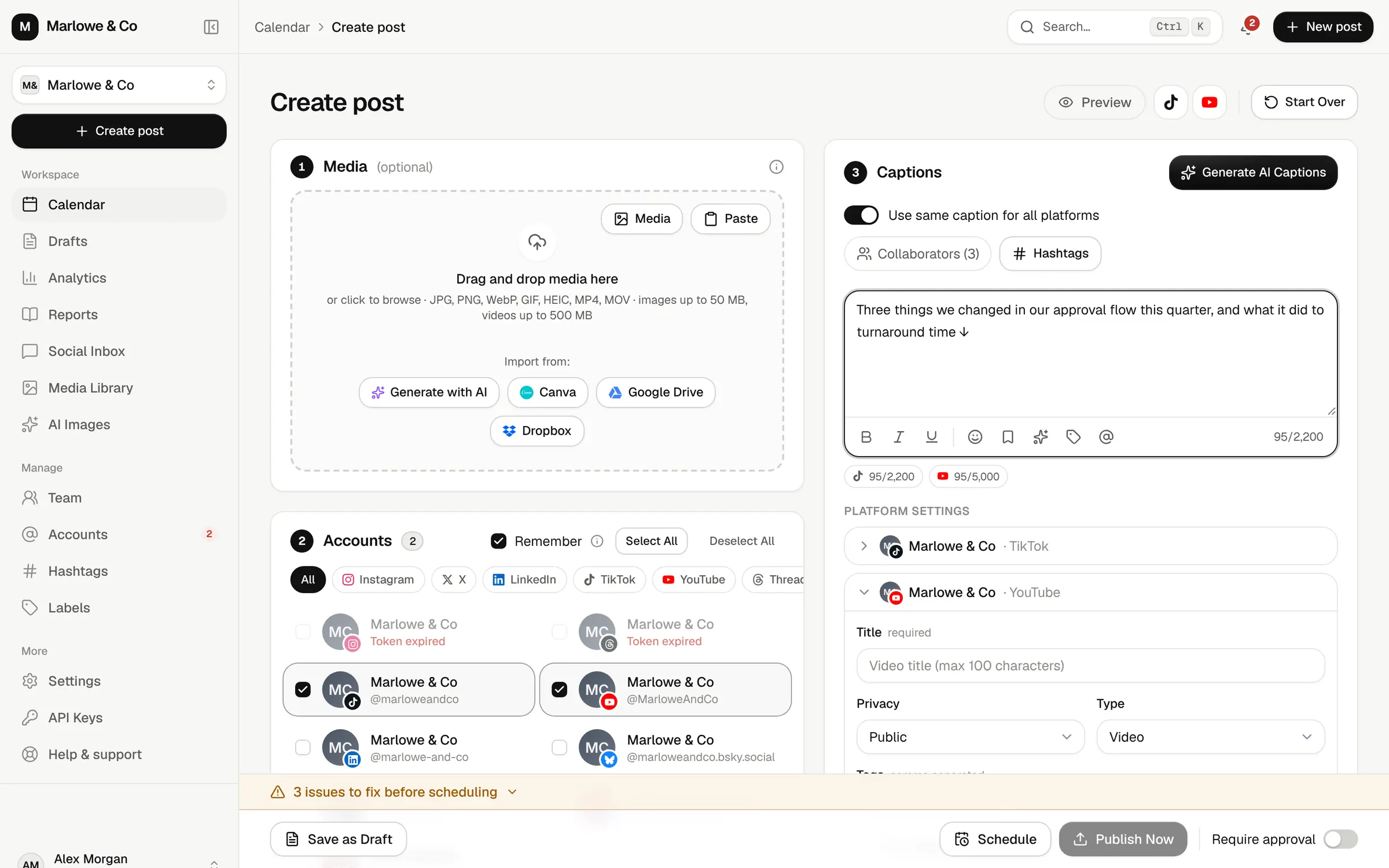
03 · Composer
Write once, see it on every platform
- Live previews and per-platform counters
- First comment where the platform supports it
- Threads on X, Threads and Bluesky, plus saved hashtag sets
Plan a month in 3 steps
Connect your accounts
Sign in to each platform once. Every connected profile becomes a filter and a publishing target.
Fill the calendar
Click a day to write a post, or load a batch with bulk scheduling. Drag anything that needs to move.
Let it publish
Posts go out on time through each platform's API, and the chip turns green when they're live.
Platform support
Works across all 10 platforms
- X
- TikTok
- YouTube
- Threads
- Bluesky
- Google Business
Content Calendar: common questions
Can I see every platform on one calendar?
Does the calendar show posts that already went out?
How do I reschedule a post?
Can I add a first comment or a thread?
Which timezone does the calendar use?
Is there a limit on how many posts I can schedule?
Content Calendar in depth
What Content Calendar does
Month, week and list views of every post across 10 platforms. Filter by platform, account, status, approval or label, drag a post to a new day, and always read times in your audience's timezone.
The calendar is where the week gets decided, so it carries the details you'd otherwise open five posts to find.
- Month, week and list views: Zoom out to spot the gaps, zoom in on a busy week, or switch to a list when you're auditing.
- Drag and drop to reschedule: Pick a post up and drop it on another day. The time stays the same, the date moves.
- Filters for every angle: Narrow by platform, account, post type, status, approval, label or who a post is waiting on.
- Timezone aware: The calendar runs in the workspace timezone and shows its offset, so 9:00 means 9:00 for your audience.
- Status at a glance: Colour-coded chips show what's scheduled, waiting for sign-off, published or needs attention.
- Labels for campaigns: Coloured labels group posts by campaign, content pillar or client so a launch reads as one block.
Month view: how it works
Each day shows its posts as small chips with the platform icons, the time and a status colour. A gap stands out the moment you open the page, and so does the post that failed overnight.
Filters: how it works
Filter by any combination of platform, account, post type, status, approval state and label. Agencies use it to show one client's month; in-house teams use it to check a single campaign end to end.
Composer: how it works
Click a day and the composer opens: one caption or a separate one per account, a live preview for each platform you picked, and a character counter that knows each network's limit. Add a first comment, or turn the post into a thread on X, Threads and Bluesky.
Why one shared calendar beats a spreadsheet
A content plan in a spreadsheet is out of date the minute someone schedules a post from a phone. A calendar connected to the accounts themselves can't drift: what you see is what will publish, and what already went out stays where it was.
It also changes the conversation with clients and managers. Instead of sending a document and waiting for comments, you share the plan itself, including approval states, so everyone looks at the same thing.
Planning across ten platforms without ten tabs
Every network has its own scheduler, and none of them show you the others. Planning a launch across Instagram, LinkedIn, TikTok and YouTube means checking four tools and hoping the timing lines up.
HeyOrbit puts all ten on one grid. You see that the Reel lands an hour after the LinkedIn post, that Pinterest is empty this week, and that two posts for the same account are a little too close together.
The details that keep a calendar trustworthy
Timezones, approvals and failures are where calendars usually lie. HeyOrbit shows the workspace timezone and its offset on screen, marks posts that are still waiting for sign-off, and turns a chip red if something didn't publish.
That way the calendar is something you can act on without double-checking each platform afterwards.
Works hand in hand with
All features- Bulk SchedulingTurn up to 20 photos or videos into scheduled posts in one go.
- Approval WorkflowsNothing publishes until the right people say yes.
- Team CollaborationUnlimited teammates, five roles and discussions on every post.
- AnalyticsFollowers, views and engagement for every account, measured per platform.
Your next month, planned by Friday.
Connect your accounts, drop in the posts and see the whole month on one screen. Start free, pay per account.
Prefer to talk first? Book a call with our team
- Unlimited team members
- 10 platforms
- Start free, pay per account