How to plan a month of social media content in a day
To plan a month of social media content, start from last month's results and this month's key dates, decide how many posts each platform gets per week, give every slot a theme, then create the posts in batches and schedule them in one sitting. Leave a few slots open for timely posts, and review the month at the end to plan the next one.
By HeyOrbit teamLast updated 4 min read
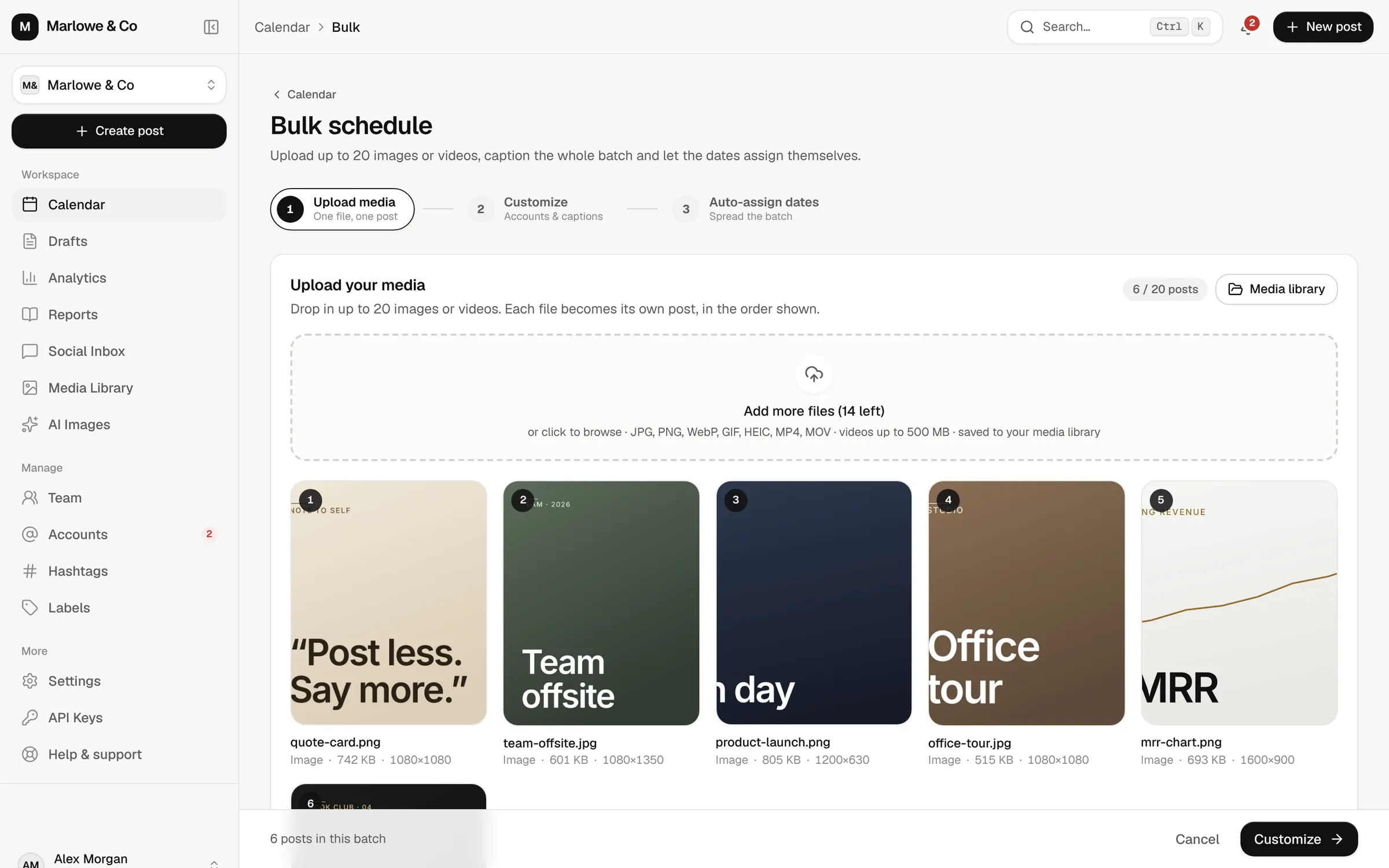
A batch of posts, captioned and spread across the month in one go.
On this page+
Why plan a month at a time#
A month is long enough to plan around launches and events, and short enough that the plan still matches reality when the posts go out. Planning in one sitting also changes how the work feels: instead of deciding what to post every morning, you make those decisions once, while you can see the whole month, and spend the rest of the month on the conversations the posts start.
The planning day, step by step#
Review last month
Open Analytics for last month and note the top posts, the weakest posts and the best times your audience engaged. Compare with the month before to see what changed (comparing periods).
List the month's key dates
Launches, events, sales, team news, and holidays or seasons that matter to your audience. Each gets a slot first, with the posts leading up to it.
Set the rhythm per platform
Decide how many posts each platform gets per week, based on what you can produce well. Consistency over the month matters more than a high number in week one.
Theme every slot
Assign each slot one of your content pillars so the month has a balanced mix (content pillars). Add the matching label in HeyOrbit so you can filter the calendar and analytics by it later.
Create the posts in batches
Shoot, write and design in focused sessions rather than one post at a time. Make each piece once and adapt it for each platform.
Schedule the month and send it for approval
Schedule everything in one sitting, with approvals switched on for anything that needs sign-off. Then check the calendar's month view for gaps and clashes (using the calendar).
A worked example#
A café with Instagram, Facebook and a Google Business Profile decides on four Instagram posts, three Facebook posts and one Business Profile update a week. Its pillars are the menu, the people, the neighbourhood and offers. The month's key dates are a new seasonal menu in week two and a live music night in week four.
| Week | Google Business Profile | ||
|---|---|---|---|
| 1 | Menu teaser, barista profile, regulars' favourites, neighbourhood walk | Opening hours, barista profile, regulars' favourites | What's new: autumn hours |
| 2 | Seasonal menu launch (Reel), behind the counter, menu close-ups, offer | Seasonal menu launch, behind the counter, offer | Offer: seasonal menu week |
| 3 | Supplier visit, customer photo, recipe carousel, open slot | Supplier visit, customer photo, open slot | What's new: supplier story |
| 4 | Music night announcement, lineup, set-up time-lapse, recap | Music night event, lineup, recap | Event: live music night |
The "open slot" rows are deliberate: something will happen that's worth posting about, and there's room for it.
Batch the work#
The month gets made fastest in batches, not one post at a time:
- Shoot in one session for the photos and clips the month needs, with a shot list made from the plan.
- Write in one session, caption after caption, while the tone is consistent.
- Schedule in one session. HeyOrbit's bulk scheduler takes up to 20 images or videos at once, one post per file, with accounts picked once for the batch, up to 20 posts a day and 15 minutes to 24 hours between them (bulk scheduling). With the optional AI Studio add-on it can also draft a caption for each post from its media.
- Send it for approval in one go. A batch can require approval like any post, and each approver gets one notification for the whole batch.
Common mistakes#
- Filling every slot. A month with no room left can't absorb news, a trend or a customer story. Keep a few slots open.
- Planning without looking back. Last month's best and worst posts are the most useful input you have. Start there.
- One theme per platform. Each platform should get the same balance of themes, adapted to the format, not "LinkedIn for news, Instagram for product".
- No buffer for approvals. Schedule the batch far enough ahead that approvers have time to review without rushing.
- Forgetting the replies. Posting is half the job. Block time each day for comments and messages (managing comments and DMs).
FAQ
How many posts should I plan per month?
As many as you can make well and keep up every week. There's no universal number; a smaller plan delivered every week does more than a big plan that stalls in week two.
How long does it take to plan a month of content?
It depends on the number of platforms and posts, but planning and scheduling in focused sessions is quicker than deciding what to post each day. Most of the time goes into making the posts, not scheduling them.
Should I schedule every post in advance?
Schedule the planned posts and keep a few slots open for news, trends and conversations. A fully scheduled month can't react.
Can I schedule a whole month at once in HeyOrbit?
Yes. Use bulk scheduling for up to 20 posts per batch, or create posts one by one on the calendar. Run more batches for a busier month.
How do I know if the plan worked?
At the end of the month, compare the month with the one before, look at which pillars and formats performed best, and adjust the next plan. A monthly report makes this a habit.
Keep reading
- Planning and cross-postingHow to create a social media content calendarBuild a social media content calendar people actually use: the fields to track, a template to copy, how to fill it each month and keep it current.
- Planning and cross-postingSocial media content pillars: what they are and how to choose yoursContent pillars are the few themes a brand posts about. How to choose three to five from your goals and audience, with examples, and how to measure them.
- Planning and cross-postingHow to repurpose one video for Reels, Shorts and TikTokEdit once for Instagram Reels, YouTube Shorts, TikTok and Facebook Reels: the one export that fits all four, the limits that differ, step by step.
- Analytics and reportingHow to create a monthly social media report people actually readWhat to put in a monthly social media report and in what order: summary, goals, audience, reach, top posts, community and next month's plan.
In the help centre