How to get social media posts approved faster
Posts get approved faster when approvers see the real post in one place, know what they're deciding and by when, and are only asked about what needs them. Cut steps to the ones that matter, send posts in batches well before their slot, and make every rejection specific so the second round is the last.
By HeyOrbit teamLast updated 4 min read
Why approvals get stuck#
Approval delays rarely come from approvers being slow. They come from the process around them:
- The post is scattered. The caption is in a document, the image in a chat, the schedule in a spreadsheet. The approver has to assemble the post before judging it.
- It's unclear who's next. Three people were copied; each assumed someone else would answer.
- Every post asks everyone. A daily tip goes through the same three steps as a pricing announcement.
- The request comes late. The post is due in an hour, so it's either rushed or late.
- Feedback is vague. "Can we make it pop?" starts a second round, then a third.
- Changes slip in after approval. Someone edits the approved post, and trust in the process erodes.
Eight ways to speed it up#
Approve the real post, in one place
Send approvers a link to the post itself, with a preview for each platform, the media, the caption and the time. In HeyOrbit that's the review page every approval request links to.
Make it obvious who's next
Show each step and who it's waiting on. The Waiting on filter on the calendar and the approvals board, with its In review, Changes requested, Approved and Scheduled columns, make the queue visible to everyone (approval workflow).
Match the steps to the risk
Keep the default flow short and add steps only for the posts that need them. Within a step, "any one" approval keeps things moving when one approver is out.
Send posts early, in batches
Plan the week or month and send a batch for approval at once. A bulk batch of up to 20 posts can be sent for approval together, and each approver gets one notification for it (bulk scheduling).
Let reminders do the chasing
Turn on Remind approvers: anyone who has been waiting more than a day gets a reminder once a day, up to three times, in the app and by email. Several posts waiting on the same person arrive as one message.
Ask for specific feedback
A rejection in HeyOrbit needs a reason, and approvers can draw on the image or a video frame to show exactly what to change. Agree as a team what a useful reason looks like: what to change, and why.
Show what changed
When the author sends a fixed post back, approvers see what changed since the version they rejected, so the second review takes seconds (version control).
Lock what's approved
With Lock content after approval on, an approved post can't be edited without going back through approval, so approvers never have to check the same post twice.
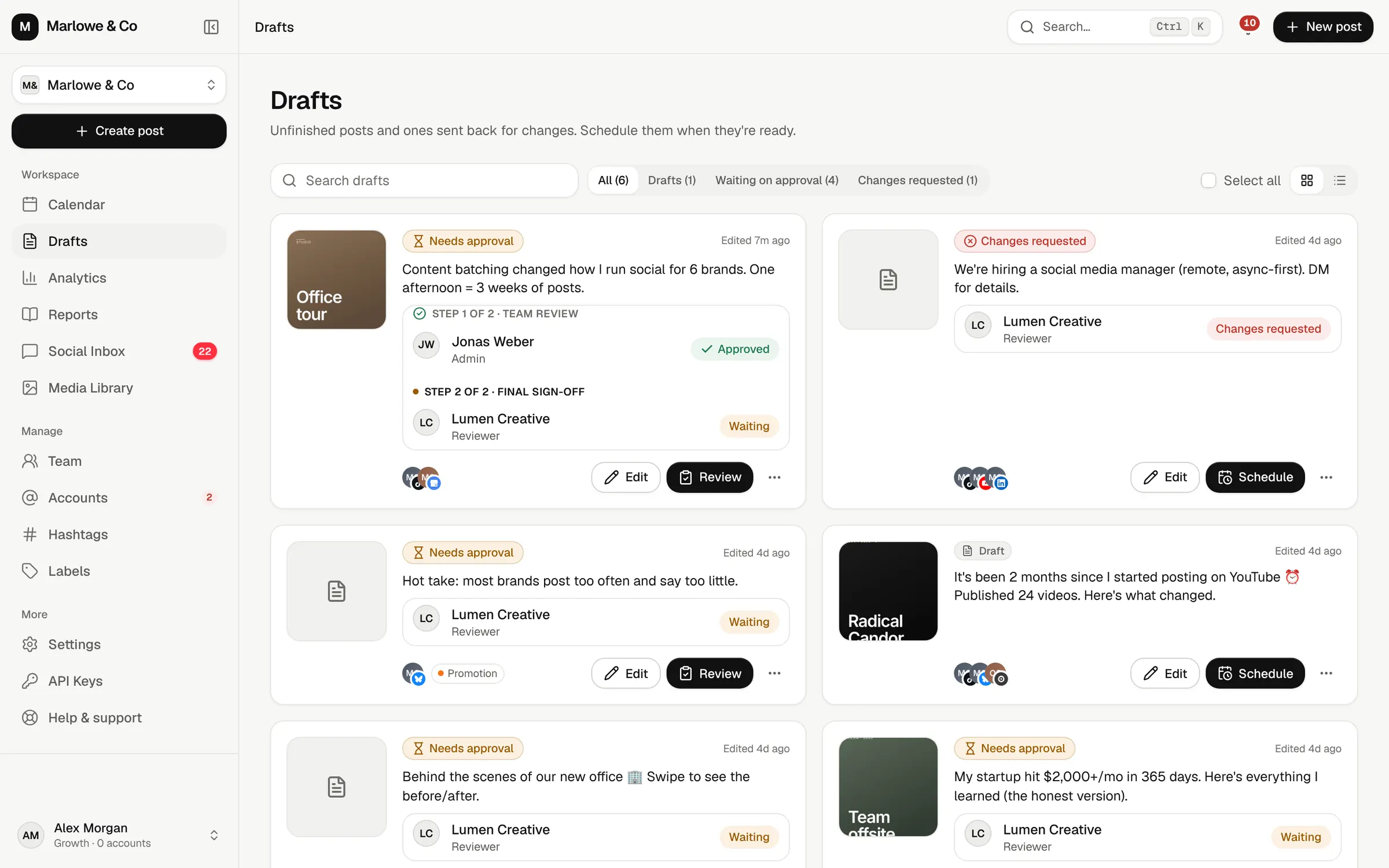
Posts waiting on approval and posts sent back for changes, each showing its steps and who it's waiting on.
Measure turnaround#
You can't speed up what you don't see. Watch how long posts sit in review and how many rounds they take. HeyOrbit's monthly report has a "What we delivered" section (posts published, on-time rate and approvals: turnaround, rounds and steps), so the process itself becomes something you review each month (monthly reports).
Common mistakes#
- Adding approvers to be safe. Every extra approver adds waiting time to every post. Add a step when there's a real risk to manage, not by default.
- Approving in chat. A thumbs-up in a chat app isn't attached to the post, so nobody can tell later which version it approved.
- Treating silence as approval. A post that hasn't been approved shouldn't publish. Reminders and a clear "waiting on" list fix silence better than deadlines that assume consent.
FAQ
How long should social media approvals take?
Agree a turnaround with your approvers that fits your publishing rhythm, and send posts early enough to leave that time. If posts regularly miss their slot, look at the number of steps and how late requests go out before blaming the approvers.
How do I stop approvers from being a bottleneck?
Give each step more than one possible approver with the "any one" rule, send posts in batches well ahead, and turn on reminders.
Should every post need approval?
Not always. You might require sign-off for campaigns, announcements and anything about pricing, and let trusted editors publish routine posts. In HeyOrbit you can require approval for a whole workspace, for one editor, or per post.
Can approvers approve from their phone?
Yes. The review page works in a phone's browser, and approval requests arrive by email when the workspace has email notifications on.
Do approvers need a paid seat?
No. Team members and reviewers are unlimited and never charged; you pay per connected social account.
Keep reading
- Teams and approvalsHow to set up a social media approval workflowSet up a social media approval process with one approver or several steps: who signs off, what they see, what a rejection does, and how to keep it fast.
- Teams and approvalsVersion control for social media posts: approve the version that publishesKeep every version of a social post sent for review, see what changed, restore an old one, and make sure the approved version is the one published.
- Planning and cross-postingHow to plan a month of social media content in a dayPlan a month of social media posts in one focused day: review last month, map key dates, theme each slot, batch-create posts and schedule in one go.
- Teams and approvalsSocial media team roles and permissions: who should be able to do whatWho on a social media team should publish, approve, manage accounts or only look: five roles, per-person limits, sample team set-ups and security habits.
In the help centre