How to set up a social media approval workflow
A social media approval workflow is the path a post takes before it publishes: who drafts it, who reviews it, who gives final sign-off and what happens when someone asks for changes. To set one up, decide who must approve which posts, turn that into one or more steps with named approvers, and use a tool that holds every post until the last step says yes.
By HeyOrbit teamLast updated 5 min read
- DraftThe author writes the post and asks for approval.
- Team reviewSomeone on the team checks facts, tone and the preview.
- Final sign-offThe person accountable for the brand signs off.
- ScheduledThe post goes on the calendar and publishes on time.
On this page+
Do you need an approval workflow?#
You need one as soon as the person writing a post isn't the person accountable for it. That covers most teams: an agency publishing for a brand, a social manager posting for a regulated business, a team where legal checks claims, a founder who wants to see anything about pricing. Without a workflow, approvals happen in chat threads and email chains, and the version that gets approved isn't always the one that goes out.
A good workflow does four things: it shows approvers the real post, not a screenshot; it holds the post until the right people have said yes; it records who approved what; and it makes a rejection specific enough to fix in one round.
Design the steps#
Start from the people, not the tool. For each kind of post, ask who has to say yes before it can go out, in what order.
- One approver suits small teams: a second pair of eyes before anything publishes.
- Two steps suits most teams: team review first, then final sign-off from the person accountable for the brand.
- Custom steps suit regulated or larger organisations, with steps named after the people who own them: team review, manager, legal and final sign-off.
For each step, decide whether any one of its approvers is enough, or everyone must approve. "Any one" keeps a step moving when someone is away; "everyone" is for steps where every voice matters, such as legal plus compliance. A later step is only asked once the step before it has passed.
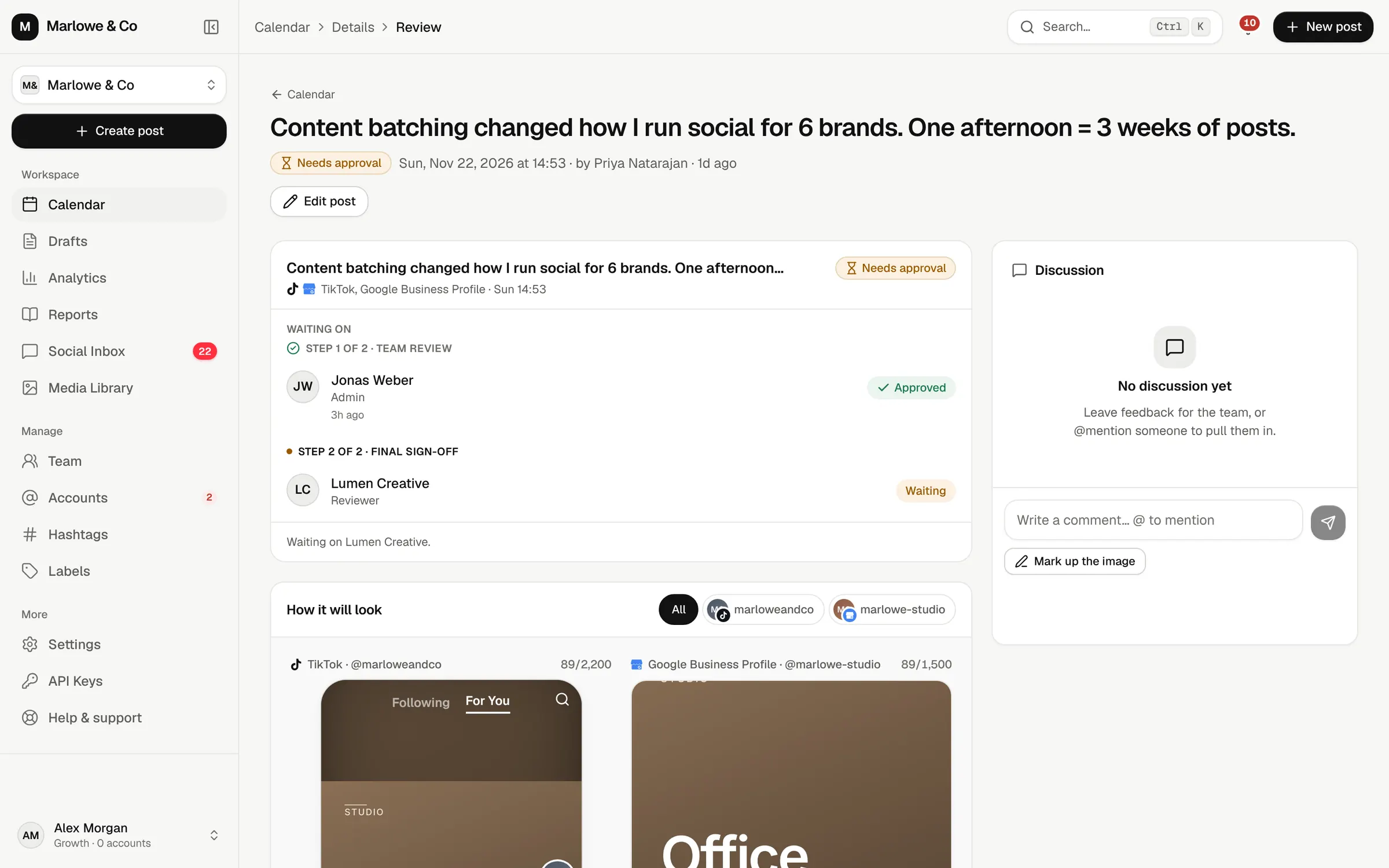
The review page: each step, who has approved, who it's waiting on, and the post as it will look.
How to set it up in HeyOrbit#
Invite approvers with the right role
Invite the people who sign off. Give anyone who approves but doesn't publish (a manager, legal, leadership, the brand's marketing lead) the Reviewer role: reviewers are free and unlimited, can comment and approve, and can't publish (roles).
Choose the workspace's flow
In the workspace's approval settings, pick No approval, One approver or Two steps, or build your own steps: up to 5 steps with up to 20 approvers each, every step named and set to "any one" or "everyone".
Decide who must use it
Turn on Require approval for the workspace so posts by editors always go through the flow, or let authors switch it on per post and choose approvers there.
Lock approved posts
Keep Lock content after approval on: an approved post can't be edited until someone unlocks it, and unlocking sends it back for approval as a new version.
Choose what happens on the last yes
With Schedule when approved on, the last approval puts the post on the calendar, or publishes it straight away if its time has passed. Turn on Remind approvers so anyone who has been waiting over a day gets a nudge.
Check the audit trail
Approvals and rejections are recorded in the workspace's audit history, so you can always show who approved what and when.
What approvers see#
Approvers get a notification, and an email when the workspace has email notifications on, linking to the post's review page. It shows how the post will look on each platform, the schedule, every step and who it's waiting on, and the post's discussion. From there they approve, or reject with a reason, and can draw on the image or a video frame to show exactly what to change (approval workflow).
Nobody can approve their own post, and a post that reaches its scheduled time without every approval simply waits: it never publishes unapproved.
After a rejection#
The post moves to Changes requested with the approver's reason attached. The author edits it and sends it again, which starts a new version: approvers can see exactly what changed since the version they rejected, word by word, instead of re-reading the whole post (version control).
Common mistakes#
- Every post through every step. A daily community post doesn't need legal. Use the workspace flow for the default and adjust the approvers on the posts that need more, or fewer, steps.
- Approval on the day. Ask for approval well before the scheduled time; a post waiting for sign-off misses its slot.
- Vague rejections. "Not quite right" costs a round. Ask approvers to say what to change, or mark it on the image.
- Approving a screenshot. If approvers see a pasted image in an email, the approved version and the published version can drift apart. Approve the post itself.
- Edits after approval. Turn on locking so an approved post can't be changed without going back through approval.
FAQ
What is a social media approval workflow?
The steps a post goes through before it publishes: who writes it, who reviews it, who gives the final sign-off, and what happens when someone asks for changes.
How many approval steps should I have?
As few as the risk allows. One approver suits most small teams, two steps (team review, then final sign-off) suit most brands and agencies, and more steps belong to regulated work.
Can approvers approve without being able to publish?
Yes. The Reviewer role can view, comment and approve, but not publish or change settings. Reviewers are free and unlimited.
What happens if a post isn't approved in time?
It waits. A post never publishes without its approvals; once the last approval comes in after the scheduled time, it publishes right away (or waits for the author if you prefer).
Can I approve a whole batch of posts at once?
A batch from bulk scheduling can be sent for approval together, and each approver gets one notification for it. Each post is still approved on its own review page, so nothing is approved by accident.
Can someone approve their own post?
No. The author of a post can never be one of its approvers.
Keep reading
- Teams and approvalsHow to get social media posts approved fasterWhy social posts get stuck in approval, and eight fixes: the real post in one place, fewer steps, early batches, specific feedback and reminders.
- Teams and approvalsVersion control for social media posts: approve the version that publishesKeep every version of a social post sent for review, see what changed, restore an old one, and make sure the approved version is the one published.
- Teams and approvalsSocial media team roles and permissions: who should be able to do whatWho on a social media team should publish, approve, manage accounts or only look: five roles, per-person limits, sample team set-ups and security habits.
- Teams and approvalsHow to manage multiple brands on social media without mixing them upRun several brands, clients or regions from one login: a workspace per brand, separate teams and timezones, per-brand branding, and a routine that scales.
In the help centre